


Data Transfer Calculator
Our Data transfer calculator helps users to calculate the time and speed to move data from one place to another, especially when transferring data from one network to another. The data transfer rate is vital to choose the bandwidth and download time of a certain Internet service provider ISP.
How Does This Transfer Data Calculator Work?
To use this time transfer calculator, you need to follow some steps that are listed below:
Input:
- Enter the file size
- The Transfer Speed
- Submit the value of the overhead percentage
- Hit the calculate button to measure data transfer rate
Output:
The data transfer calculator generates the following results:
- The data transfer rate (minutes, hours, day and in weeks)
Data Transfer Speed and Duration
You can calculate the transfer speed using a network transfer speed calculator or by using the following formula:
$$ \text{Speed} = \frac{\text{Data Transferred}}{\text{Duration}} $$
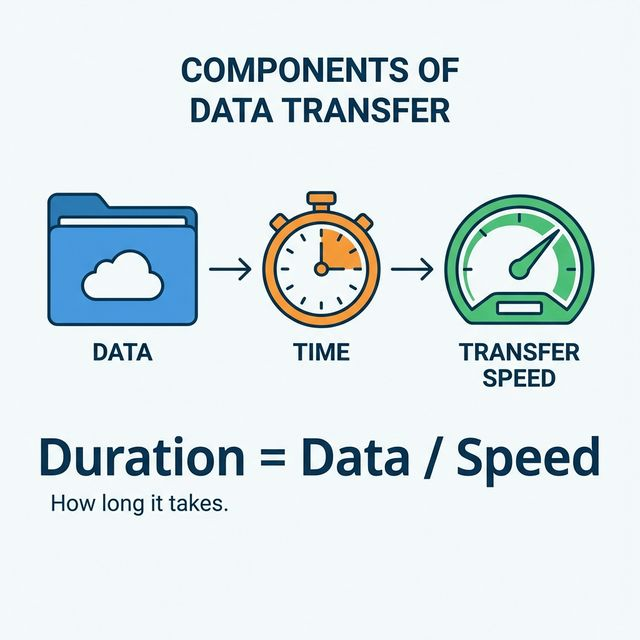
Similarly, to calculate the transfer duration, rearrange the formula:
$$ \text{Duration} = \frac{\text{Data Transferred}}{\text{Speed}} $$
Data Transfer Rate (DTR):
Data Transfer Rate is the ratio of the total amount of digital data transferred between two points in a specific time. It can be measured manually or using a data transfer calculator.
$$ \text{DTR} = \frac{\text{Total Digital Data Transferred}}{\text{Total Time Taken}} $$
In short,
$$ \text{DTR} = \frac{D}{T} $$
For more accurate measurements, you can use a data transfer bandwidth calculator.
Conversion Units of Data Transfer Rate:
The Data Transfer Rate (DTR) is measured in Megabits per second or Megabytes per second. The highest data transfer rate system in Japan is around 1414 terabits per second using only a single optical fiber cable. We need to follow the proceeding conversions to calculate data transfer rate.
| Decimal Prefix | Binary Prefix |
|---|---|
| $$ 1\ \text{kbit/s (kbps)} = 1000\ \text{bit/s} = 10^3\ \text{bit/s} $$ | $$ 1\ \text{kbit/s (kbps)} = 1000\ \text{bit/s} = 10^3\ \text{bit/s} $$ |
| $$ 1\ \text{Mbit/s} = 1\,000\,000\ \text{bit/s} = 10^6\ \text{bit/s} $$ | $$ 1\ \text{Mibit/s} = 2^{20}\ \text{bit/s} \approx 1{,}048{,}576\ \text{bit/s} $$ |
| $$ 1\ \text{Gbit/s} = 10^9\ \text{bit/s} $$ | $$ 1\ \text{Gibit/s} = 2^{30}\ \text{bit/s} \approx 1{,}073{,}741{,}824\ \text{bit/s} $$ |
| $$ 1\ \text{Tbit/s} = 10^{12}\ \text{bit/s} $$ | $$ 1\ \text{Tibit/s} = 2^{40}\ \text{bit/s} \approx 1{,}099{,}511{,}627{,}776\ \text{bit/s} $$ |
Overheads or Fluctuations:
We need to calculate data transfer rate by adding the overheads of data transmission. These extra bits ensure smooth and error-free transmission of data.
How overheads or fluctuation occur in data transmission?
- Due to interference, noise, and bad connections
- Due to communication equipment
- Due to router speed
Practical Example:
Let’s calculate the Data Transfer Rate (DTR) of a 500 MB file over a 15 Mbps data connection without using a data transfer calculator.
Solution:
Step 1: Convert Megabytes to Megabits
$$ 15\ \text{MB} \times 8 = 120\ \text{Mb} $$
Step 2: Use the Data Transfer Rate formula
$$ \text{DTR} = \frac{\text{Data Transferred}}{\text{Speed}} $$
Step 3: Insert the values
$$ \text{DTR} = \frac{4000\ \text{Mb}}{15\ \text{Mbps}} $$
Step 4: Calculate the time
$$ \text{DTR} = 266.64\ \text{seconds} \approx 4\ \text{minutes 26 seconds} $$
Thus, the data transfer time is approximately 4 minutes 26 seconds.
How to Denote Units?
| Name | Symbol | Bit Per Second | Byte Per Second | Bit Per Second (Formula) | Byte Per Second (Formula) |
|---|---|---|---|---|---|
| Bit/Second | Bit/s | $$ 1 $$ | $$ 0.125 $$ | $$ 1 $$ | $$ \frac{1}{8} $$ |
| Byte/Second | B/s | $$ 8 $$ | $$ 1 $$ | $$ 8 $$ | $$ 1 $$ |
| Kilobit/Second | kbit/s | $$ 8 \times 10^3 $$ | $$ 10^3 $$ | $$ 8 \times 10^3 $$ | $$ 10^3 $$ |
| Kibibit/Second | Kibit/s | $$ 2^{10} = 1{,}024 $$ | $$ 2^7 = 128 $$ | $$ 2^{10} $$ | $$ 2^7 $$ |
| Kilobyte/Second | kB/s | $$ 8 \times 10^3 $$ | $$ 10^3 $$ | $$ 8 \times 10^3 $$ | $$ 10^3 $$ |
| Kibibyte/Second | KiB/s | $$ 8{,}192 $$ | $$ 1{,}024 $$ | $$ 2^{13} $$ | $$ 2^{10} $$ |
How to Transfer Data from One iPhone to Another?
- Backup the data of your old iPhone.
- Download the backed-up data to your new iPhone.
- Or simply transfer your data using a QR code.
How to Transfer Data from Android to iPhone?
To transfer data from an Android phone to iPhone, you can either use data transfer apps or copy the data to a laptop/PC and then transfer it to your iPhone. If using the second option, use USB 3.0 for maximum transfer speed.
FAQs
How do I Calculate Data Transfer Speed?
Follow the below-mentioned steps to calculate data transfer speed:
- Note the size of the file by downloading it.
- Note down the downloading time.
- You can get the data transfer speed by dividing the file size by measured time.
How do I Calculate the Transfer Time of Data?
To calculate the transfer time of data, follow the steps mentioned below:
- Find the size of the data you are going to transfer.
- Determine the transfer rate of your internet.
- Divide the file size by the speed to calculate the transfer time.
What is the Data Transfer Rate of USB 3.0?
The data transfer rate of USB 3.0 is 5 Gbps, which can also be expressed as:
$$ 5\ \text{Gbps} = 5 \times 10^9\ \text{bits/sec} = 625\ \text{MB/sec} $$
Thus, USB 3.0 can transfer approximately 625 MB per second.
What Factors Affect Data Transfer Speed?
The speed of data transfer can be affected by multiple factors like:
- Transfer technology used for transmission
- Location of the user
- The number of users
- The devices and peripherals
- The nature of the network(Mobile or Fixed network)
References:
From the source of techtarget.com: DTR,Data Transfer Rate
From the source of geeksforgeeks.org: Importance of data transfer, Factors affecting data transfer rate
Related Tools