


Degrees of Freedom Calculator
Select statistical distribution type and type in the necessary inputs to calculate the probablity of a continuous random variable through this calculator.
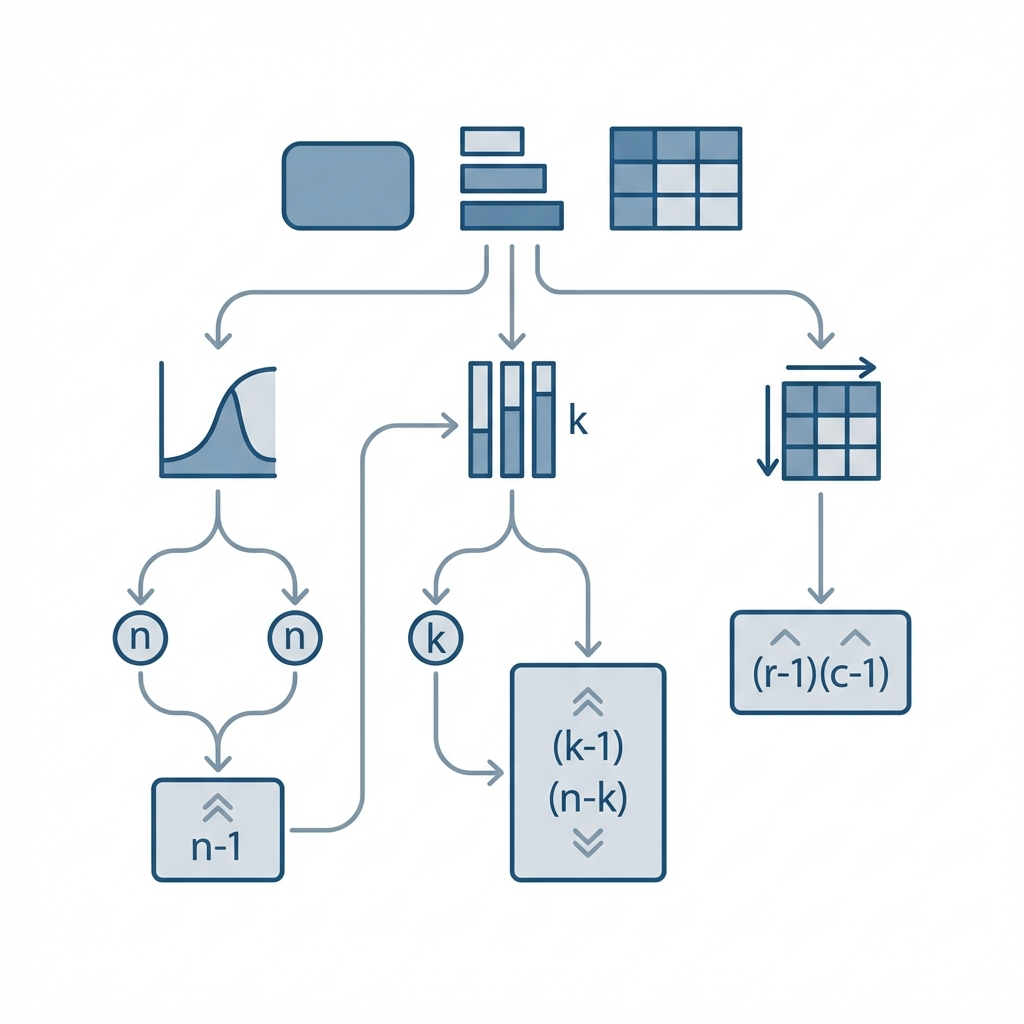
Use this degrees of freedom calculator to find out the crucial variable of one and two sample t tests and chi-square test and also ANOVA.
What Are Degrees of Freedom?
The possible values in a dataset that can be altered to get the proper estimation of the data are called degrees of freedom.
How To Find Degrees of Freedom?
No doubt the best way to calculate the statistical variable is by using free degree of freedom calculator. But you must also comprehend the manual calculations that are possible only if you take into consideration the following expressions:
Degrees of Freedom Formula:
Let’s have a look at the following statistical tests and their related formulas for degrees of freedom calculation:
1-Sample t-Test:
For this test, the degrees of freedom (df) is calculated as:
\[ df = N - 1 \]
Where:
- N = Total number of values in the dataset
- df = Degrees of Freedom
2-Sample t-Test:
Here, degrees of freedom differ for equal and unequal variances:
Equal Variances:
When the variances of both samples are equal:
\[ df = N_1 + N_2 - 2 \]
- N₁ = Number of entities in the first sample
- N₂ = Number of entities in the second sample
Unequal Variances:
When the variances of the samples are unequal (Welch's t-test):
\[ df = \frac{\left(\frac{\sigma_1^2}{N_1} + \frac{\sigma_2^2}{N_2}\right)^2}{ \frac{\sigma_1^4}{N_1^2 (N_1 - 1)} + \frac{\sigma_2^4}{N_2^2 (N_2 - 1)} } \]
- \(\sigma_1^2\) = Variance of first sample
- \(\sigma_2^2\) = Variance of second sample
- N₁, N₂ = Sample sizes
Where:
σ = Variance (for calculations, tap variance calculator)
ANOVA:
For this statistical procedure, we have the following degrees of freedom equations:
Between Groups:
ANOVA Degrees of Freedom:
Between Groups:
\[ df_\text{between} = k - 1 \]
Within Groups:
\[ df_\text{within} = N - k \]
Overall (Total) Degrees of Freedom:
\[ df_\text{total} = N - 1 \]
Chi-Square Test:
The degrees of freedom for a Chi-Square test is calculated as:
\[ df = (\text{rows} - 1) \times (\text{columns} - 1) \]
For quick and better approximations, start using this best degrees of freedom calculator.
How To Calculate Degrees of Freedom?
Let’s move ahead and resolve a couple of examples to clarify the concept in more depth!
Example # 01:
How to find degrees of freedom for t Test with data values as 23?
Solution:
Here we have:
N = 23
Calculating degrees of freedom:
df = N-1
df = 23 -1
df = 22
Example # 02:
How to determine degrees of freedom for a Chi Square table representing the marital status by education below:
| Status | Middle or Lower School (%) | High School (%) | Bachelor’s (%) | Master’s (%) | PhD (%) | Total (%) |
| Single | 46 | 40 | 25 | 17 | 18 | 30 |
| Married | 31 | 40 | 54 | 67 | 64 | 50 |
| Divorced | 15 | 10 | 11 | 6 | 9 | 10 |
| Widowed | 8 | 10 | 11 | 11 | 9 | 10 |
| Total | 100 | 100 | 100 | 100 | 100 | 100 |
Solution:
Given:
- Number of rows = 4
- Number of columns = 5
Step 1: Apply the Chi-Square degrees of freedom formula:
\[ df = (\text{rows} - 1) \times (\text{columns} - 1) \]
Step 2: Substitute the values:
\[ df = (4 - 1) \times (5 - 1) \]
Step 3: Perform the multiplication:
\[ df = 3 \times 4 = 12 \]
Final Answer: Degrees of Freedom = 12
How Our Calculator Works?
Let's learn together how you can swiftly find degree of freedom in a couple of clicks with this free dof calculator. Stay with it!
Input:
- From first drop-down list, select for which test you wish to find this particular variable
- After you make a selection, do enter all required elements in their designated fields
- At last, tap the calculate button
Output:
- Degree of freedom for selected test type
- T-Statistics
- Standard Deviations
References:
From the source of Wikipedia: Degrees of freedom, Applications, Mechanics From the source of Study.com: Degrees of Freedom, critical values
Related Tools